

How React Virtual DOM works under the Hood
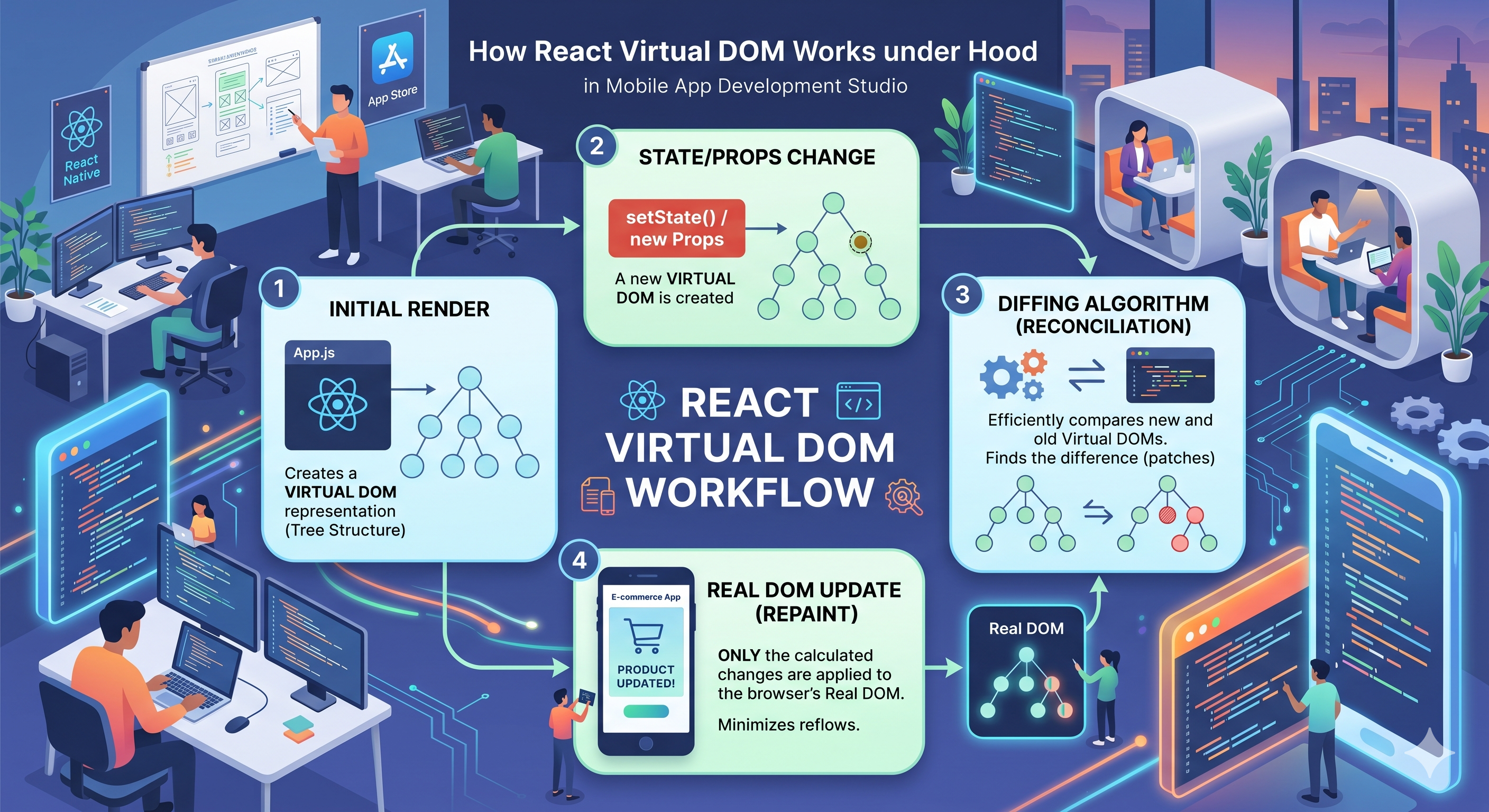
If you've used React, you've probably heard that it uses a Virtual DOM to make updates fast. But what does that actually mean? What's really happening between the moment you call setState() and when the browser repaints the screen?
What problem the Virtual DOM solves
To understand Virtual DOM, you first need to understand why direct DOM manipulation is expensive.
The browser's DOM is a tree of objects representing your HTML. When JavaScript touches the DOM — querying, updating, inserting — the browser has to do a lot of internal work:
Recalculate styles — figure out what CSS applies to the changed element
Reflow (Layout) — recompute the geometry and position of every affected element
Repaint — redraw the pixels on screen
Compositing — flatten layers onto the final visible canvas
Imagine you have a list of 1,000 items and only one item changes. Naively, you might re-render the entire list. That means 1,000 DOM writes instead of 1. Virtual DOM is React's solution to this problem.
Difference between Real DOM vs Virtual DOM
| Property | Real DOM | Virtual DOM |
|---|---|---|
| What it is | Browser's live tree of HTML nodes | Lightweight JavaScript object tree (plain JS) |
| Where it lives | Browser engine | JS heap — just a JavaScript object |
| Cost to create/clone | Expensive — triggers style calc, layout | Cheap — just allocating a JS object |
| Cost to update | Expensive — reflow, repaint required | Cheap — just mutating a JS object |
| Who manages it | Browser | React's reconciler |
| Purpose | Actual rendered UI | Blueprint to compute minimal real DOM changes |
The Virtual DOM isn't a feature of HTML or browsers — it's a programming technique. React maintains an in-memory copy of the UI as a plain JavaScript object and syncs it with the real DOM as efficiently as possible.
What a Virtual DOM Node Actually Looks Like
When you write JSX, Babel compiles it into React.createElement() calls. Each call returns a plain JavaScript object — the Virtual DOM node (also called a React element).
// JSX you write

<div className="card">
  <h2>Hello, React!</h2>
  <p>Count: {count}</p>
</div>
//What Babel compiles it to

React.createElement(
  "div",
  { className: "card" },
  React.createElement("h2", null, "Hello, React!"),
  React.createElement("p", null, "Count: ", count)
)
//The resulting Virtual DOM object (React Element)

{
  type: "div",
  props: {
    className: "card",
    children: [
      {
        type: "h2",
        props: { children: "Hello, React!" },
        key: null
      },
      {
        type: "p",
        props: { children: ["Count: ", 5] },
        key: null
      }
    ]
  },
  key: null
}
Initial render process in React
When React first mounts your app, it needs to build the UI from scratch. Here's the flow:
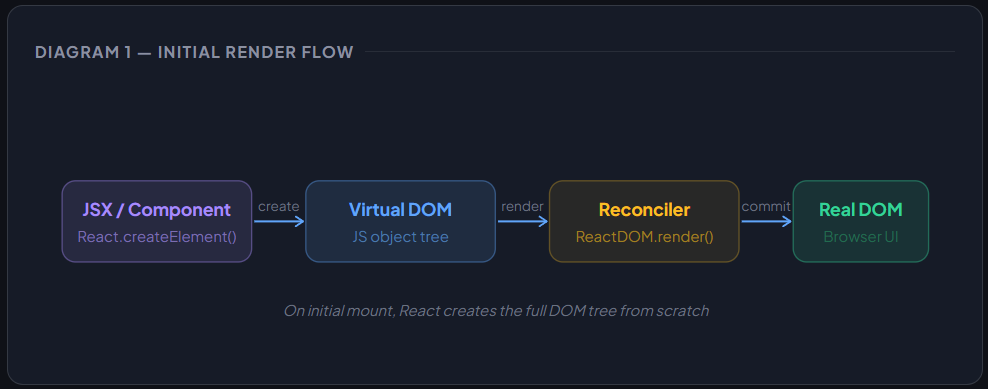
On initial render there is no previous Virtual DOM to compare against. React simply walks the Virtual DOM tree and creates real DOM nodes for each element — document.createElement(), setAttribute(), appendChild(), and so on. This is the only time React creates DOM nodes from scratch in a single pass.
How state or props change triggers re-render
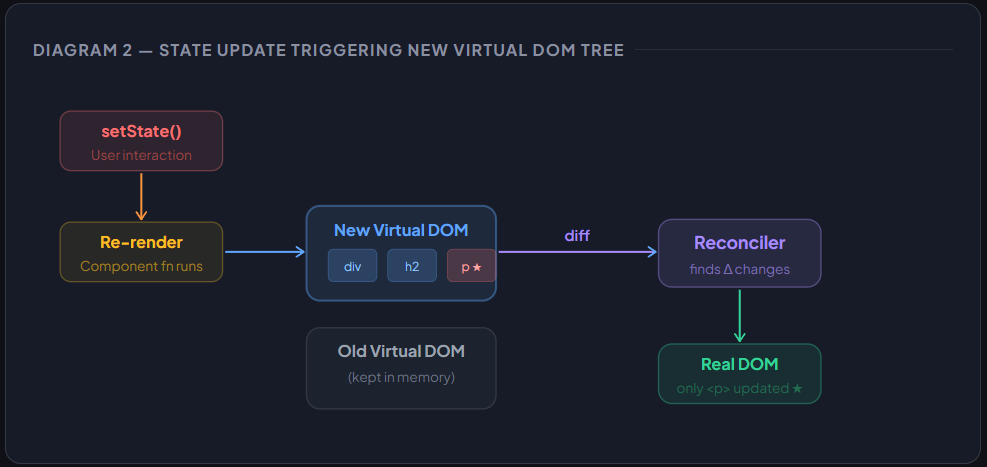
Here's where things get interesting. When you call setState() or a parent re-renders a child with new props, React doesn't immediately touch the DOM. Instead, it:
1️⃣ Marks the component as "dirty"
React schedules a re-render for the component whose state/props changed, plus all its descendants by default.
2️⃣ Calls the render function again
React re-invokes your component function (or render() method), producing a brand new Virtual DOM tree representing the updated UI.
3️⃣Holds both trees in memory
React now has the old Virtual DOM (what's currently on screen) and the new Virtual DOM (what should be on screen).
4️⃣Runs the diffing algorithm
React compares old vs new trees to find the minimum set of changes needed. This is called reconciliation.
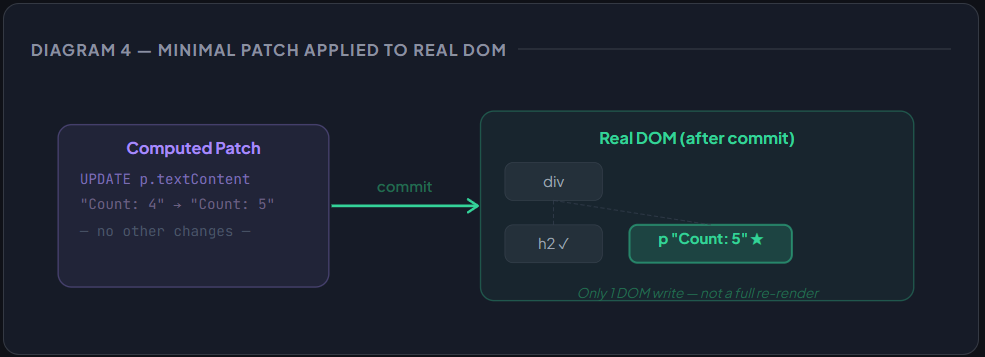
5️⃣Commits only the differences
React applies only the computed changes to the real DOM — not a full re-render.
How React finds minimal required changes
React's diffing algorithm works by walking both trees simultaneously — old and new — node by node. For each pair of nodes at the same position, it applies these rules:
Rule 1 — Type mismatch: If
oldNode.type !== newNode.type(e.g.,div→section), unmount the old subtree entirely, mount the new one.Rule 2 — Same DOM element type: If types match (both
div), keep the DOM node and only update changed attributes.Rule 3 — Same component type: If types match (both
<Counter />), keep the component instance (and its state!) and pass new props. Re-render is triggered if props changed.Rule 4 — Key match in lists: React uses
keyto pair children between renders, allowing efficient reordering detection.
The Fiber Reconciler
What Fiber adds at a high level:
— Work units: Each component becomes a "fiber" node — a unit of work that can be paused, resumed, or abandoned.
— Priority scheduling: React can assign different priorities to updates. A keypress update can interrupt a slow animation update.
— Concurrent rendering: React can prepare a new tree "in the background" without committing it — the foundation for Suspense anduseTransition.The Virtual DOM diffing logic is the same. Fiber changes when and how that work gets scheduled — not the algorithm itself.
Why this approach improves performance
1️⃣ Batch DOM writes
Instead of scattered reads-then-writes that cause repeated reflows, React batches all DOM mutations into a single commit. This avoids layout thrashing entirely.
2️⃣Minimal DOM surface area
Only the nodes that actually changed get touched. The browser only needs to reflow/repaint the affected subtree, not the entire page.
3️⃣JavaScript is faster than DOM
Diffing two JavaScript objects is orders of magnitude cheaper than touching the DOM. React pays a small JS computation cost to avoid a much larger browser layout cost.
4️⃣Component identity preservation
When a component's type stays the same, React keeps the existing DOM node and component instance (with state). No unmount/remount means no lost state and no animation jank.
High-level overview of React render → diff → commit flow
Every React update goes through three distinct phases:
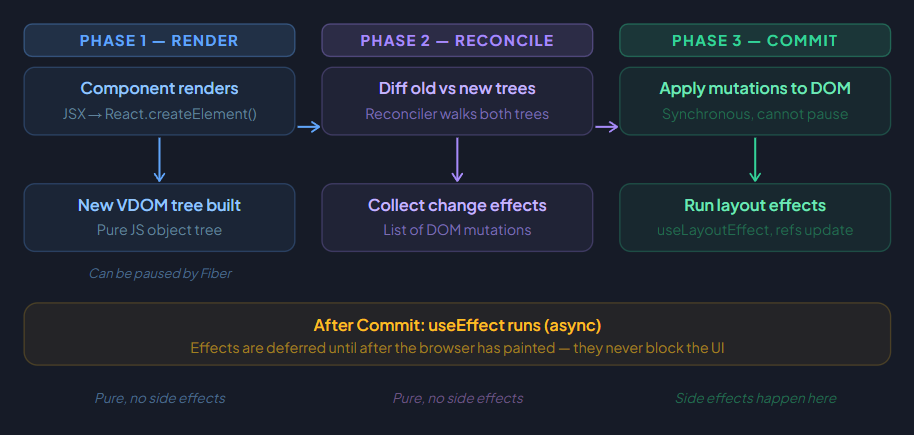
The render and reconcile phases are pure — they only compute things, never touch the browser. This is why Fiber can safely pause and resume them. The commit phase is synchronous and uninterruptible, because a half-applied DOM mutation would leave the UI in an inconsistent state.
Why This Actually Improves Performance

| Concept | What it means | When it happens |
|---|---|---|
| React.createElement() | Creates a VDOM node (plain JS object) | Every render call |
| Reconciliation | Diffing old vs new VDOM to find changes | After every state/props update |
| Fiber | Unit of work; enables pausable rendering | React internals |
| Commit phase | Applying DOM mutations synchronously | After reconciliation |
key prop |
Stable identity for list items during diff | During list reconciliation |
| useLayoutEffect | Runs synchronously after DOM mutations | During commit phase |
| useEffect | Runs asynchronously after browser paint | After commit + paint |


